
Boot FOG from a machine’s own EFI System Partition
FOG 1.6
This page is a FOG 1.6 addition. The archive layout described here landed with the EMBED-less iPXE change and does not exist on earlier releases.
Some machines cannot PXE boot at all — firmware with no network boot option. On others you would simply rather not reorder the boot menu for every task. Both can boot FOG from an iPXE binary sitting on the machine’s own EFI System Partition.
The server publishes ready-to-copy archives for this, so you fetch one over HTTP rather than hand-rolling a symlink out of the TFTP tree:
https://<your-fog-server>/fog/service/localboot/
  manifest.json          index of everything below, with sha256 for each file
  fog-esp-x86_64.zip
  fog-esp-i386.zip
  fog-esp-arm64.zip
Note
Where the
zippackage is missing the installer falls back to.tar.gz.manifest.jsonalways names the file that was actually produced, so read the name it gives rather than assuming an extension.
Local ESP boot is not a Secure Boot feature and needs no Secure Boot keys. It predates Secure Boot by years; Secure Boot only added the requirement for a signature. The archives are published either way.
Which folder
Each archive is packed flat and holds one folder per boot route. Copy the folders
onto the ESP — \EFI\FOG\ is a good place — keeping them intact, then point the
firmware boot manager at one file inside one folder.
| Situation | Folder |
|---|---|
| Machine PXE boots normally | secureboot-upstream\ |
| No PXE boot option, or firmware provides no SNP | fog-ipxe\ |
| Secure Boot on with FOG’s MOK enrolled, or Secure Boot off, and you want to keep the shim | secureboot-fog\ |
FOG’s certificate is in db | fog-ipxe\ — no shim needed |
The -customca\ variants of the two FOG folders exist only where the server was
installed with --rebuild-ipxe-with-my-ca. They are the same builds with your CA
embedded, so iPXE will accept an HTTPS FOG server whose certificate chains to a
private CA. Under Secure Boot they behave identically — see
Custom CA versus Secure Boot.
Nothing in the archive chains anything else
The binary you pick reads the script beside it and boots FOG. If it does not work, pick a different one — there is no fallback chain to wait for, by design.
An earlier layout did chain, and it could re-enter itself and hang the firmware. See Why the shim’s second stage is not the file you expect.
What works in which Secure Boot state
Measured on physical hardware, VMware and KVM.
| Folder | SB off | SB on, nothing enrolled | SB on, MOK enrolled | SB on, cert in db |
|---|---|---|---|---|
secureboot-upstream\ | yes | menu only | yes | yes |
fog-ipxe\ | yes | no | no | yes |
secureboot-fog\ | yes | no | yes | yes |
menu only means it reaches FOG’s menu, exits to disk and can run MokManager — but imaging tasks fail. FOS’s kernel is signed by your server, so imaging needs that certificate trusted however you reached the menu. “Nothing enrolled” is a bootstrap state, not a destination.
Two results that surprise people
A MOK does nothing for
fog-ipxe\. MokList belongs to shim, and firmware never reads it. Booting FOG’s binary directly under Secure Boot needs the certificate indb.With nothing enrolled,
secureboot-fog\does not offer to enrol — it simply fails. shim launches MokManager only when a MOK request is already pending, and nothing in this archive stages one. Enrol first, then boot.
Enrolling FOG’s certificate
MOK.der in the archive does two jobs. Only the name advertises the first.
As a MOK, for the shim routes
Boot a shim from secureboot-upstream\ or secureboot-fog\. When it cannot verify
the next stage it launches MokManager: choose Enroll key from disk and select
MOK.der from that same folder. Reboot.
See Secure Boot: MOK enrollment for the full walkthrough.
As the db certificate, for booting with no shim
Add MOK.der to db. db is what firmware checks to verify a boot image; PK and
KEK only control who may change db.
How many variables you need depends on who performs the write.
It is decided by what the platform will accept a variable write from, which
is a question about Setup/Custom Mode — not about db.
| Enrolling via | Variables you supply | Why |
|---|---|---|
| The firmware’s own tool, or a hypervisor setting, with the platform in Setup/Custom Mode | db alone | In Setup Mode the firmware does not check who signed the update, so nothing has to vouch for db. The platform still has its own PK, and that is what keeps Secure Boot on |
| A running OS, platform in Setup/Custom Mode — FOG’s enrolment task | db, KEK and PK | The same unchecked write, but nothing else is going to supply a PK. Without one the machine stays in Setup Mode with Secure Boot off; PK and KEK are also what let FOG update db again later |
| A running OS, platform in User Mode holding a PK you do not control | none — the route is closed | Every update to db, KEK and PK must be signed by a key already in KEK or PK. On a machine carrying a vendor PK you cannot write any of the three, and supplying all three is not a workaround |
The first row is confirmed twice: MOK.der added to db by itself on VMware,
then a FOG-signed binary booted with no shim; and FOG’s own db.auth written
alone on EDK2/OVMF, which lands and survives a reboot. So an existing machine’s
firmware UI asking for all three is not evidence that db depends on them — it is
offering the only write it can authenticate from a stranger, which is replacing
the whole chain. You do not have to accept that offer if you can write db
directly.
The second row is what FOG’s own task does — see
Setup Mode enrollment — and why the
.auth files exist.
"Unauthenticated" means unverified, not unsigned
Setup Mode skips the signature check. It does not accept a bare certificate: every write to
db, KEK or PK must still be a properly formed authenticated variable update, and handing the raw.esl/.derbytes toefivarfsfails withEINVALeven in Setup Mode. A firmware file picker builds that wrapper for you, which is why it takesMOK.der; FOG’s task cannot, which is why FOG ships.authfiles.
Measured on EDK2/OVMF, not on every firmware
The table was re-measured in issue 1267 against edk2-ovmf under QEMU with SMM, in both Setup and User Mode, including a User Mode platform carrying Microsoft’s PK. Physical firmware menus, PowerShell’s
Set-SecureBootUEFIand BitLocker/PCR 7 behaviour are still untested. If yours behaves differently —dbalone rejected at a firmware menu, or adbwrite accepted from an OS tool on a machine whose PK you do not hold — please report it on the FOG forums or on that issue.
MOK.der is the intermediate, and FOG’s signatures carry it inside them, so this
one certificate covers every binary in the archive and the signing leaf can be
rotated without re-enrolling anything.
On VMware, put MOK.der in the VM’s directory and add to the .vmx:
uefi.secureBoot.dbDefault.file0 = "MOK.der"
On an existing VM, uefi.allowAuthBypass = "TRUE" lets you add it through the
firmware UI instead.
Hand the firmware
MOK.der, not the.authfiles
PK.auth,KEK.authanddb.authare signed EFI variable updates, for FOG’s own unattended enrolment task — see Setup Mode enrollment. A firmware menu or a hypervisor cannot read them. OfferingPK.authto a firmware file picker is the single most common way this goes wrong.
Three things to know before enrolling a fleet
Append, never replace.
uefi.secureBoot.dbDefault.append = "FALSE"drops Microsoft’s certificates fromdband Windows stops booting.Changing
dbis measured into TPM PCR 7, so it can trigger BitLocker recovery. Suspend BitLocker first on machines that use it; see TPM, BitLocker and Windows Hello after imaging.
dbis a firmware-level, machine-wide, effectively permanent trust anchor. Anything your server’s key signs will boot before any OS — a broader grant than a MOK, which only shim honours. Removing an entry later is another per-machine firmware visit.
What db enrolment unlocks elsewhere
Once firmware trusts your certificate, the shim stops being necessary anywhere — not just for local ESP boot:
- Netboot under Secure Boot, with no configuration change. FOG’s generated DHCP
config already hands out its own
snponly.efi; the shim path is the commented-out alternative. Adb-enrolled fleet keeps the default and works, with two fewer images loaded and verified per boot and no MokManager visit per machine. - Imaging with no shim in the chain, since FOS’s kernel carries the same signature.
- The
refind_efiexit type from a shim-less boot — rEFInd is signed by your server too. - Anything else FOG signs, such as custom kernels.
- Pre-enrolment at template level.
uefi.secureBoot.dbDefault.file0in a VM template means every VM is FOG-bootable from creation. Vendor tooling (Dell Command | Configure, HP BCU, Lenovo) can pushdbentries to physical fleets the same way.
If it does not bring up your network
First, check the firmware has an IPv4-configured NIC at all
This is the trap, and it costs people a day. If the NIC’s IPv4 setting is not DHCP, no SNP device exists — so
snpandsnponlybuilds find nothing, and the firmware shows no UEFI PXE boot option either, which looks exactly like a machine with no PXE ROM.
On OVMF/KVM, from the firmware front page:
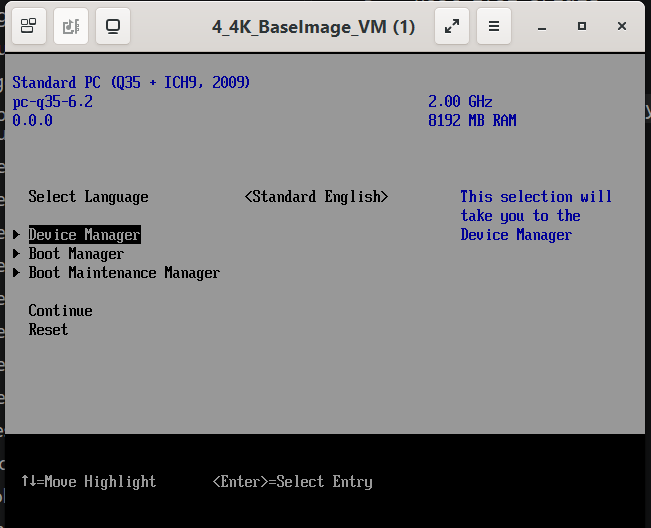
Device Manager → Network Device List:
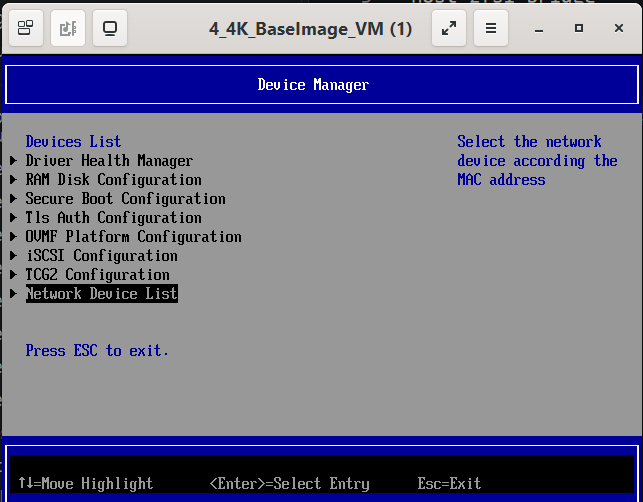
Pick the NIC by its MAC:
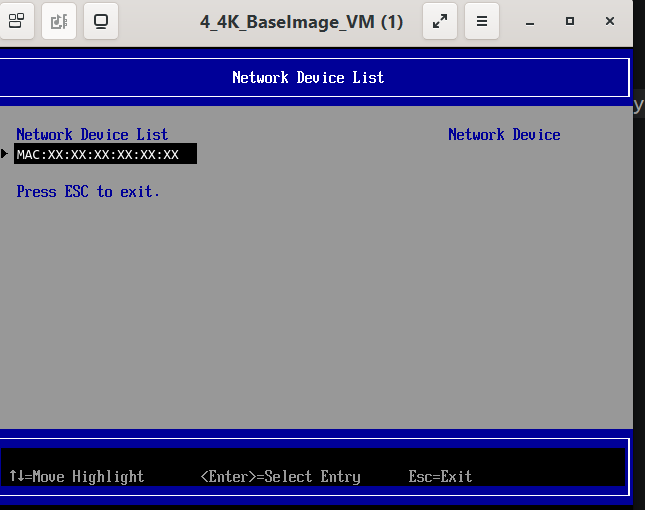
IPv4 Network Configuration:
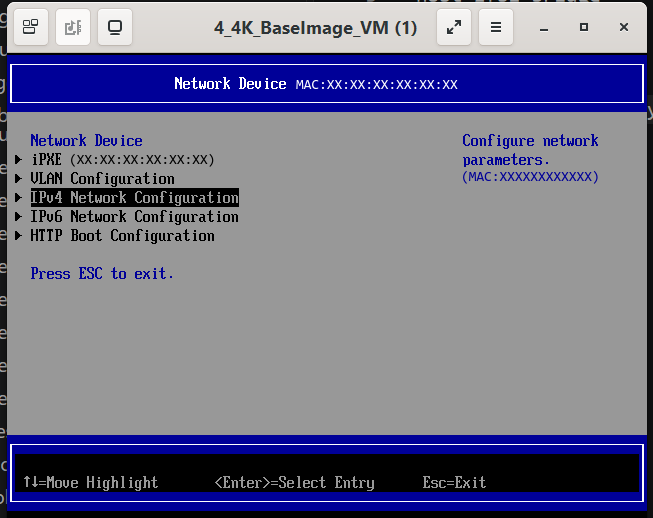
Tick Enable DHCP, then save with F10. The device and the UEFI PXE boot option both appear afterwards.
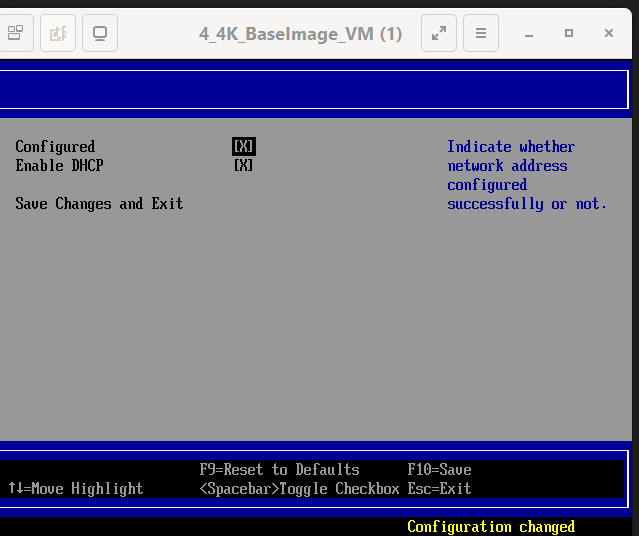
If the network really is the binary’s problem, point the boot manager at a different one:
| Binary | When |
|---|---|
fog-ipxe\fogipxe.efi | all of iPXE’s own NIC drivers. Start here on firmware with no PXE boot option — such firmware usually provides no SNP either, so a binary needing one is no use to it |
fog-ipxe\fogsnp.efi | drives the NIC through the firmware’s SNP protocol |
fog-ipxe\fogintel.efi | Intel only, for when the all-drivers build misbehaves on that NIC |
fog-ipxe\fogrealtek.efi | Realtek only, same reason |
fog-ipxe\fogsnponly.efi | binds only the device iPXE was loaded from — off an ESP that is the disk, so in principle it finds no NIC, though it booted fine on every machine tested here |
No order beyond that is prescribed, because it genuinely varies: two machines tested during this work disagreed about which build drove their NIC, one reporting SNP and the other NII.
Why the shim’s second stage is not the file you expect
secureboot-fog\ contains FOG’s build twice, as ipxe.efi and as
snponly.efi, plus both of upstream’s shims. That is coverage, not duplication.
shim derives its second stage from its own filename, at runtime. Many firmwares
will not report the loaded image’s filename, and when that happens shim falls back
to ipxe.efi — whichever shim you launched
(ipxe/ipxe#1684). Observed directly:
snponly-shimx64.efi netboots snponly.efi correctly but, booted off an ESP,
hunts for ipxe.efi. Over TFTP the device path carries the filename; off an ESP it
does not.
Two consequences:
- Never rename a shim. Renaming cannot change what it looks for, and where firmware does report the name it breaks the derivation outright.
- In
secureboot-upstream\the two shims are not independent entry points on affected firmware — booting either lands on upstream’sipxe.efi.
Note
The same mechanism is why the folders each carry their own
autoexec.ipxe, and why every copy is identical. iPXE reads that script from the directory the running binary was loaded from. An earlier layout put a chain script at the archive root and different boot logic in a subfolder; a chained binary resolves the script by flat name through a synthetic filesystem handle, so it re-read the root script, chained itself, and recursed until the firmware ran out of memory.
Changing how it boots
autoexec.ipxe is a text file. Edit it and the next boot picks the change up — no
toolchain, no rebuild. Every copy in the archive is identical, so edit the one in
the same folder as the binary you boot, or all of them if you switch between them.
If your switch runs STP or port power-save and the link is not up when iPXE first
asks for DHCP, uncomment the sleep at the top — or reinstall the server with
--boot-delay <seconds>, which writes that line here and for netboot clients at
the same time.
Custom CA versus Secure Boot
These two get conflated constantly, and they are independent:
- CA embedding decides whether iPXE will accept your FOG server’s HTTPS certificate. You need it only for a private CA.
- Secure Boot signing decides whether firmware or shim will load the image at all.
Both variants are signed with the same key, so one enrolment covers either and they
behave identically in the table above. Use -customca\ when your server uses HTTPS
with your own CA; otherwise the plain folders are fine.
See also
- Secure Boot: MOK enrollment — the attended shim route
- Secure Boot: Setup Mode enrollment — FOG’s unattended
db/KEK/PK task - Secure Boot: signing FOS with your own key
- UEFI boot entries