
DHCP Server Settings (1.5)
This page describes FOG 1.5.
See the 1.6 version of this page for FOG 1.6.
If you do not use FOG to provide DHCP services in your network (which is a very common and completely supported configuration), then you need to configure the existing DHCP server to use fog as the tftp server to get the pxe boot files from, and you need to configure what boot file to use.
Info
If you do not have access to your DHCP server, or are using a device that isn’t capable of specifying option 066 and 067 (next server and file name) you can use ProxyDHCP instead The most popular ProxyDHCP method with fog is dnsmasq. This article will walk you through that: Proxy DHCP with DNSMasq (1.5)
These two DHCP options must be set:
Option 66
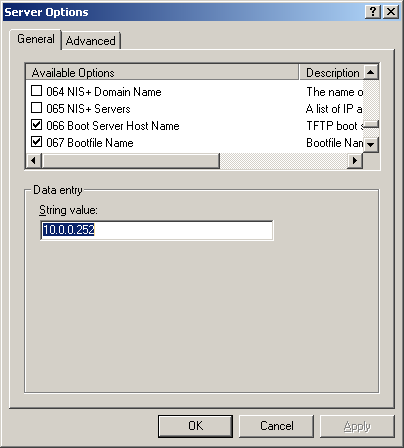
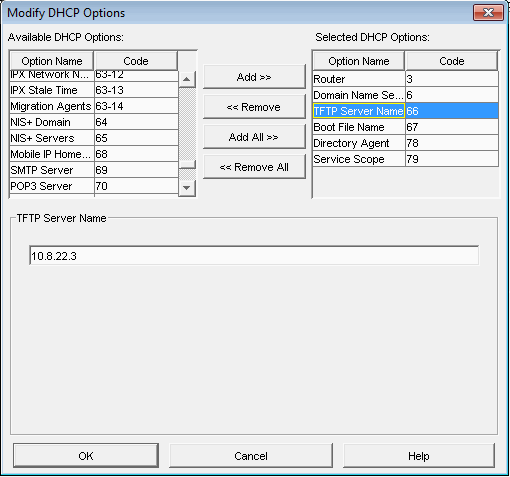
Set Option 66, also called ‘Boot Server’, ‘Next server’ or ‘TFTP Server’ to the IP address or hostname of the FOG server.
Option 67
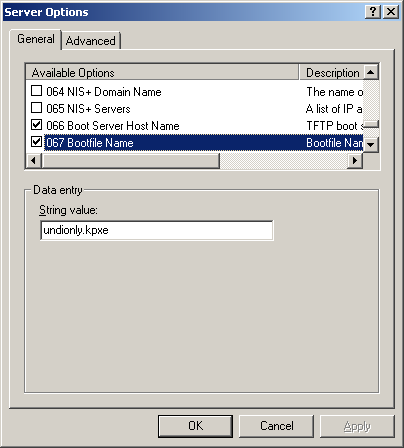
Set option 67, also called ‘Bootfile Name’ to the ipxe boot file that works best in your environment.
1.5's file names now match 1.6's
FOG 1.5’s iPXE binaries come from the same release packaging as 1.6’s, so the file names and paths below are identical between the two versions — a
kea-dhcp4.conf/dhcpd.confwritten for a 1.6 server works unchanged for a 1.5 server. What differs is how the UEFI boot script reaches the client for FOG’s own (non-Secure-Boot) builds — see How UEFI clients get their boot script (1.5) below.
For modern UEFI environments, use the signed chain (you simply enter this file name into the dhcp setting):
secureboot/snponly-shimx64.efi— 64-bit UEFIsecureboot/arm64-efi/snponly-shimaa64.efi— ARM64 UEFI
This is the recommended default even if you are not using Secure Boot
The signed chain boots identically whether Secure Boot is enabled or not — a DHCP request cannot report Secure Boot state, and nothing here needs it to. Pointing every 64-bit UEFI client at the shim covers the Secure Boot machines and costs the others nothing, so there is no reason to configure the other names first and migrate later.
Secure Boot and an HTTPS install don't mix on 1.5
Unlike 1.6, FOG 1.5 has no way to put the web UI on HTTPS without also rebuilding iPXE locally with this server’s own CA embedded — and a locally rebuilt binary can’t carry Microsoft’s signature. If this server was installed with
-S/--force-https(or you answered yes to the installer’s HTTPS prompt), thesecureboot/files above are never staged at all, and you should point DHCP at FOG’s own builds below instead. See HTTPS and the -S flag (1.5).
The alternative is FOG’s own builds, in the TFTP root rather than under
secureboot/:
snponly.efi— 64-bit UEFIi386-efi/snponly.efi— 32-bit UEFI (there is no signed 32-bit chain, on either version)arm64-efi/snponly.efi— ARM64 UEFIipxe.efi— the all-drivers build, for firmware whose own network stack does not work
Most newer clients will be able to boot with one of the efi boot files above, but older hardware models that do not have UEFI support and only support legacy BIOS firmware will not boot.
Tip
If you have a mixed environment see Bios and UEFI Co-Existence
For older legacy models, these are the boot files to set
- undionly.kpxe
- undionly.kkpxe
- ipxe.kpxe
- ipxe.kkpxe
You can find other pxe boot files in you /tftpboot directory on your fogserver.
How UEFI clients get their boot script (1.5)
On FOG 1.6, every UEFI binary is built without its iPXE boot script compiled
in, so it fetches a plain-text autoexec.ipxe over TFTP and runs that — see
the 1.6 version of this section.
1.5 works the other way round for FOG’s own builds:
| Binary | Script | Editable without a rebuild? |
|---|---|---|
secureboot/snponly-shimx64.efi, secureboot/arm64-efi/snponly-shimaa64.efi | fetched (autoexec.ipxe) | Yes — same as 1.6 |
snponly.efi, i386-efi/snponly.efi, arm64-efi/snponly.efi, ipxe.efi (plain root, unsigned) | compiled in | No — these behave like the legacy BIOS builds |
autoexec/snponly.efi, autoexec/i386-efi/snponly.efi, autoexec/arm64-efi/snponly.efi | fetched (autoexec.ipxe) | Yes |
The Secure Boot chain is script-less on both versions — a pre-signed binary
can’t carry a custom compiled-in script either way, so if you followed the
recommended secureboot/ configuration above, editing /tftpboot/autoexec.ipxe
(menu timeout, etc.) works exactly as it does on 1.6.
It’s only if you point DHCP at FOG’s own plain, unsigned UEFI builds that
1.5 differs: those have the script compiled in, and autoexec.ipxe is never
read. If you want editable-script behavior for those builds specifically,
point DHCP at the autoexec/ copies instead — autoexec/snponly.efi rather
than snponly.efi, and so on. (1.6 removed this autoexec/ folder, because
it flipped the default the other way: the plain root binaries became the
script-less ones there.)
Warning
Legacy BIOS always has its script compiled in, on both versions. Editing
autoexec.ipxechanges nothing forundionly.kpxe/undionly.kkpxeeither way.
No
--boot-delayon 1.51.6 can insert a sleep before a client’s first DHCP attempt (
--boot-delay <seconds>), for switches slow to come out of STP or power-save. That flag — and the automatic BIOS/UEFI handling behind it — doesn’t exist on 1.5’s installer. If your switches need this, configure the delay in your DHCP server or switch settings instead; see Fog installer command line options (1.5) for the full 1.5 option list.
Examples of DHCP server configurations
The below are some examples with screen shots on how to configure these settings in some servers. The screenshots are a bit old but the general idea is still the same on modern versions
Dedicated Linux DHCP server (Kea)
If you run a dedicated Kea DHCP server (separate from your FOG server), you can serve the right boot file to each client architecture (legacy BIOS vs. UEFI vs. ARM64) by classifying clients on the PXE vendor-class string. This is the same approach FOG uses when it hosts DHCP itself, so it is the most-tested configuration. 1.5’s Kea support is the same code as 1.6’s — there’s nothing version-specific about this section.
Tip
When you run the FOG installer and answer No to “Would you like to use the FOG server for DHCP service”, FOG writes a ready-to-copy sample to
kea-dhcp4.conf.fog-samplein the FOG web root (e.g./var/www/html/fog/kea-dhcp4.conf.fog-sample) withnext-serveralready set to your FOG server. Copy that file to your Kea server as/etc/kea/kea-dhcp4.confand edit the network-specific values below.
A complete kea-dhcp4.conf for a dedicated Kea server:
{
    "Dhcp4": {
        "interfaces-config": { "interfaces": [ "eth0" ] },
        "lease-database": { "type": "memfile", "lfc-interval": 3600 },
        "valid-lifetime": 21600,
        "max-valid-lifetime": 43200,

        "next-server": "10.0.0.10",
        "option-data": [
            { "name": "tftp-server-name", "data": "10.0.0.10" }
        ],

        "subnet4": [
            {
                "id": 1,
                "subnet": "10.0.0.0/24",
                "pools": [ { "pool": "10.0.0.100 - 10.0.0.250" } ],
                "option-data": [
                    { "name": "subnet-mask", "data": "255.255.255.0" },
                    { "name": "routers", "data": "10.0.0.1" },
                    { "name": "domain-name-servers", "data": "10.0.0.2" }
                ]
            }
        ],

        "client-classes": [
            {
                "name": "FOG-Legacy-BIOS",
                "test": "substring(option[60].hex,0,20) == 'PXEClient:Arch:00000'",
                "boot-file-name": "undionly.kkpxe"
            },
            {
                "name": "FOG-UEFI-32-2",
                "test": "substring(option[60].hex,0,20) == 'PXEClient:Arch:00002'",
                "boot-file-name": "i386-efi/snponly.efi"
            },
            {
                "name": "FOG-UEFI-32-1",
                "test": "substring(option[60].hex,0,20) == 'PXEClient:Arch:00006'",
                "boot-file-name": "i386-efi/snponly.efi"
            },
            {
                "name": "FOG-UEFI-64-1",
                "test": "substring(option[60].hex,0,20) == 'PXEClient:Arch:00007'",
                "boot-file-name": "secureboot/snponly-shimx64.efi"
            },
            {
                "name": "FOG-UEFI-64-2",
                "test": "substring(option[60].hex,0,20) == 'PXEClient:Arch:00008'",
                "boot-file-name": "secureboot/snponly-shimx64.efi"
            },
            {
                "name": "FOG-UEFI-64-3",
                "test": "substring(option[60].hex,0,20) == 'PXEClient:Arch:00009'",
                "boot-file-name": "secureboot/snponly-shimx64.efi"
            },
            {
                "name": "FOG-UEFI-ARM64",
                "test": "substring(option[60].hex,0,20) == 'PXEClient:Arch:00011'",
                "boot-file-name": "secureboot/arm64-efi/snponly-shimaa64.efi"
            },
            {
                "name": "FOG-Surface-Pro-4",
                "test": "substring(option[60].hex,0,32) == 'PXEClient:Arch:00007:UNDI:003016'",
                "boot-file-name": "secureboot/snponly-shimx64.efi"
            }
        ]
    }
}
What to change for your network (everything else can stay as-is):
| Value | Set it to |
|---|---|
interfaces (eth0) | The NIC your Kea server listens on (or "*" for all) |
next-server and tftp-server-name (10.0.0.10) | The IP address of your FOG server |
subnet / pools (10.0.0.0/24, pool range) | The network and lease range you are serving |
routers (10.0.0.1) | Your network’s gateway |
domain-name-servers (10.0.0.2) | Your DNS server(s) |
The boot-file-name values are files FOG ships in /tftpboot — leave them as-is. The client-classes match on DHCP option 60 (the PXE PXEClient:Arch:NNNNN vendor-class string) so each architecture is handed the correct binary automatically:
| Value | What it is |
|---|---|
undionly.kkpxe | the BIOS build — script compiled in, no Secure Boot in CSM mode |
i386-efi/snponly.efi | 32-bit UEFI, necessarily unsigned, and script compiled in on 1.5 (see above) |
secureboot/snponly-shimx64.efi | the signed chain for 64-bit UEFI — the Microsoft-signed shim, which then loads secureboot/snponly.efi |
secureboot/arm64-efi/snponly-shimaa64.efi | the same for ARM64 |
Two fallbacks worth knowing about, both a DHCP-only change with nothing renamed
server-side: swap snponly- for ipxe- (secureboot/ipxe-shimx64.efi) if the
chain loads but the network never comes up, which points at the firmware’s own
UEFI SNP driver; or drop back to the plain snponly.efi / arm64-efi/snponly.efi
if you want FOG’s own builds instead of upstream’s signed pair — remembering
those have the boot script compiled in on 1.5 (see above).
Note
Apple Intel netboot (BSDP) is not supported by Kea. If you must netboot Intel Macs, keep those on an ISC-DHCP server (FOG’s ISC config still includes the BSDP class).
After editing, validate the file before starting the service:
kea-dhcp4 -t /etc/kea/kea-dhcp4.confTip
Prefer ISC-DHCP or already run it? A dedicated ISC
dhcpd.confuses the same idea withclass/filenameblocks (match if substring(option vendor-class-identifier, 0, 20) = "PXEClient:Arch:00007"). The easiest reference is the/etc/dhcp/dhcpd.confFOG generates when it hosts DHCP — copy itssubnetandclassblocks to your dedicated server and changenext-serverto your FOG server’s IP.
Windows Server DHCP
Option 060 stops UEFI network boot
If your DHCP server sets option 060 to
PXEClient, UEFI clients get an address and then never download a boot file. BIOS clients keep working, so it looks like a UEFI fault. Remove option 060 unless WDS runs on the DHCP server. See Remove option 060 from Windows DHCP.
Setting the options with powershell
This little powershell snippet will get all your dhcp server scopes and set option 66 and option 67 to the values you input into the script.
Note
This requires the dhcp module that is installed on a server when the dhcp role is added. You can also add it to your windows workstation machine by installing rsat tools, and of course it also requires admin privileges to manage the dhcp server options. This script will set the options at the scope/subnet levels rather than at a global server level
#define your dhcp server hostname or ip
$dhcpSvr = 'dhcp.yourDomain.tld'
#define your fog server fqdn, hostname, or ip
$fogAddr = 'fogserver.yourDomain.tld'
#define you pxe boot file -- the signed chain, which boots with Secure Boot on or off
$pxeBootFile = 'secureboot/snponly-shimx64.efi'

#get all the scopes from the main dhcp server and expand to the nested ipAddressToString property of the scopeIDs to get a string array of scope ids`

$scopes = (Get-DhcpServerv4Scope -ComputerName $dhcpSvr).scopeID.ipaddresstostring

#loop through all dhcp scopes and add the options
$scopes | Foreach-object {
	$dhcpOptions = @{
        ComputerName = $dhcpSvr;
        ScopeId = $_
	}
	Set-DhcpServerv4OptionValue @dhcpOptions -OptionID 66 -value $fogAddr;
    Set-DhcpServerv4OptionValue @dhcpOptions -OptionID 67 -value $pxeBootFile;
}
Setting the options in the dhcp console
You can get to the server or scope options of your dhcp server in dhcpmgmt.msc and set them like so
- Option 66
Tip
This can be the ip address, hostname, of fully qualified domain name (fqdn) of your fog server.
- Option 67
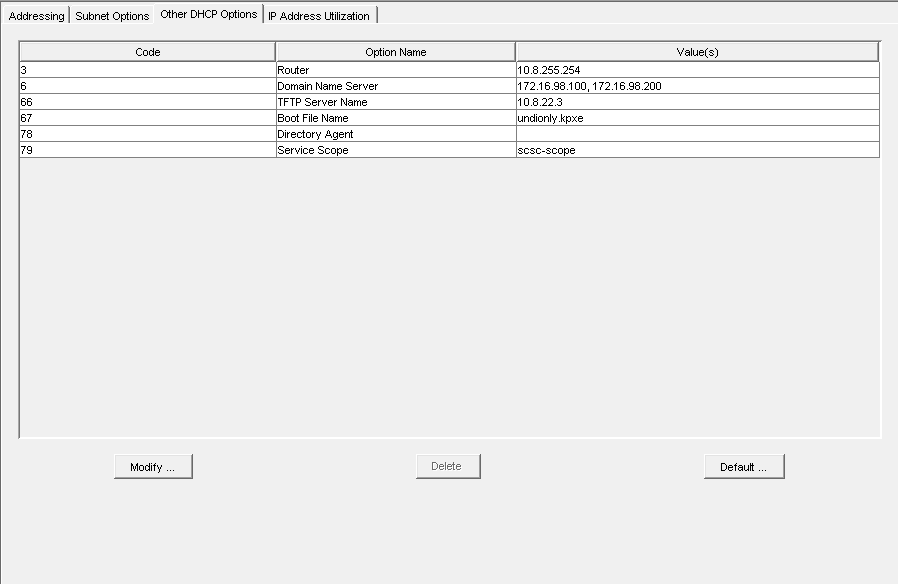
Novell (Linux) Server DHCP
- DHCP Overview from DNS/DHCP Console (Netware 6.5)
- Option 66
- Option 67
 Here is a link from Novell’s website on how to setup their DHCP server:
http://www.novell.com/coolsolutions/feature/17719.html
Here is a link from Novell’s website on how to setup their DHCP server:
http://www.novell.com/coolsolutions/feature/17719.html